Storage Costs Page Overview
What is the Storage page?
The Storage page shows a detailed breakdown of your storage costs at SKU level.
From this page, you can:
• View storage per SKU
• See product names
• Check volume
• Review units stocked
• Understand cost per item
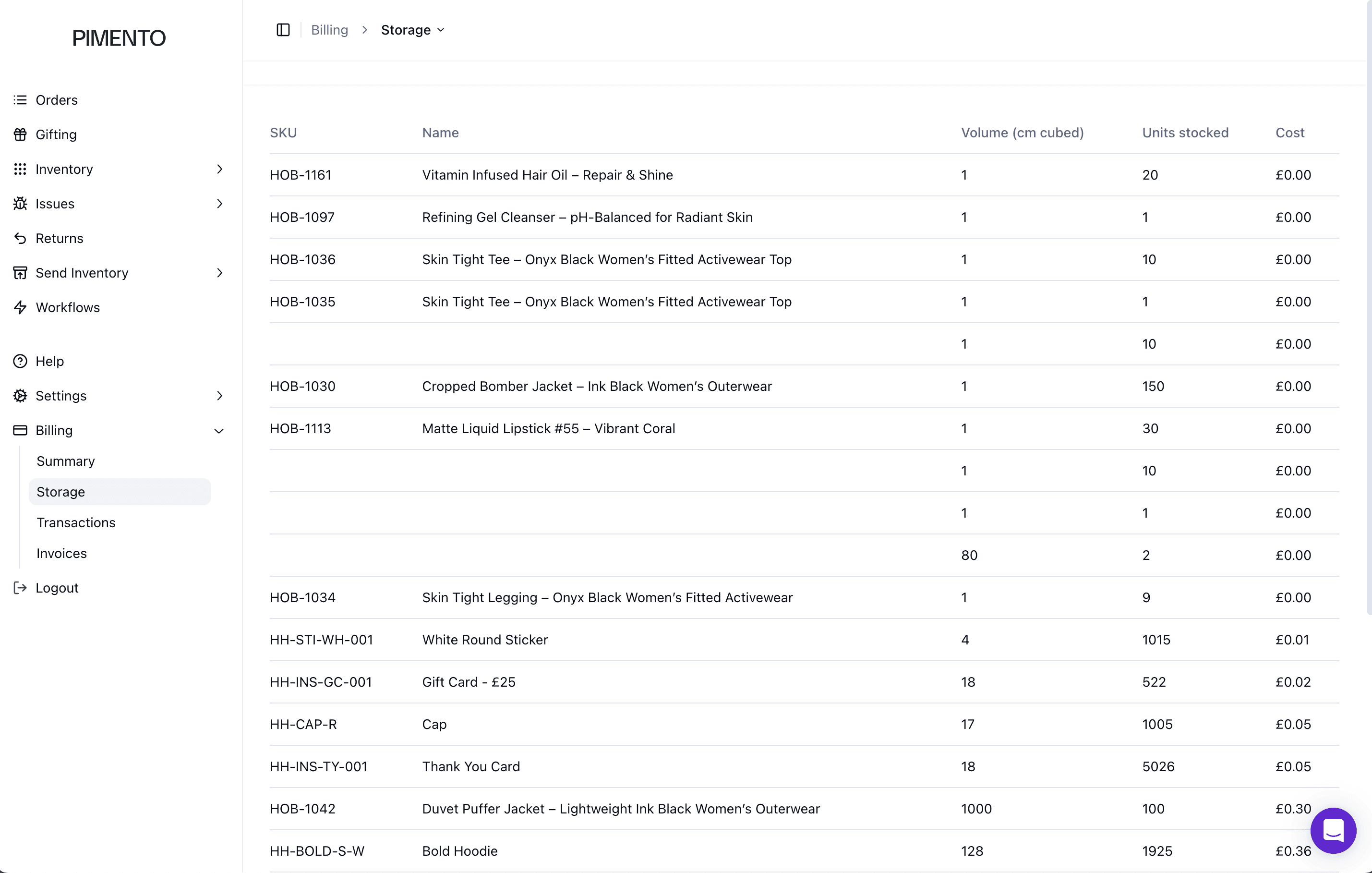
Understanding the storage table
The table includes:
• SKU
• Name
• Volume (cm cubed)
• Units stocked
• Cost
SKU
Shows the unique stock identifier for each product.
If you want to learn more about SKUs click here.
Name
Displays the product name linked to the SKU.
Volume (cm cubed)
Shows how much space each unit takes up. Larger items take up more space and may contribute more to storage cost.
Units stocked
Shows how many units are currently stored. Both volume and quantity affect total storage cost.
Cost
Shows the storage cost linked to that SKU. This helps identify which products are contributing most to storage charges.
Why this page is useful
This page helps you understand:
• Which products take up the most space
• Which SKUs have high stock levels
• Where storage costs are coming from
FAQs
Why is storage shown per SKU?
To show exactly which products are contributing to storage costs.
Does higher stock always mean higher cost?
No — volume also plays a major role.