Packaging Overview (How Packaging Works)
What is Packaging?
Packaging defines how products are packed and shipped within Pimento.
It represents the physical packaging type used during fulfilment, such as:
• Boxes
• Parcels
• Custom packaging formats
Each packaging option includes important details used during shipping and fulfilment
Packaging Structure
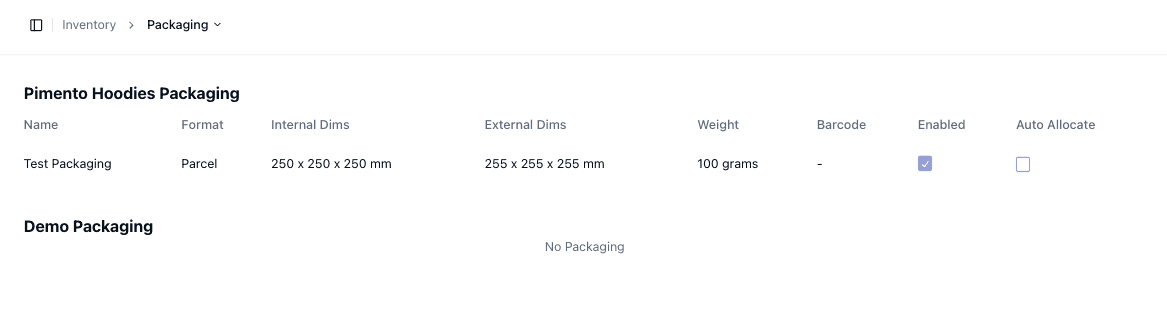
Each packaging option contains:
• Name
• Format (e.g. Parcel)
• Internal Dimensions
• External Dimensions
• Weight
• Barcode (optional)
These values are used to determine how items are packed and how shipments are calculated
Dimensions and Weight
Packaging includes both internal and external dimensions:
• Internal Dimensions → Space available for products
• External Dimensions → Total package size for shipping
Weight is used for:
• Shipping calculations
• Carrier selection
Accurate values are important for correct fulfilment
Enabled vs Disabled
Each packaging option can be toggled:
• Enabled → Available for use
• Disabled → Not used in fulfilment
This allows you to control which packaging types are active
Auto Allocation
Packaging can be automatically assigned using Auto Allocate
When enabled:
• The system will automatically select packaging during fulfilment
When disabled:
• Packaging may need to be selected manually
Important Notes
• Accurate dimensions are critical for shipping accuracy
• Disabled packaging will not be used in fulfilment
• Auto allocation depends on correct configuration
• Packaging setup impacts carrier rates and shipping logic
FAQs
Can I have multiple packaging types?
Yes — you can configure multiple packaging options
What happens if auto allocation is off?
Packaging may need to be selected manually during fulfilment